
1편에서 글로벌 store의 세 가지 한계를 살펴봤습니다.
- 같은 컴포넌트를 여러 개 렌더링하면 상태가 공유되고
- 부모에서 받은 props로 store를 초기화할 수 없으며
- 테스트 간 store 상태가 누수되는 문제였습니다
이번 글에서는 이 문제들을 실제로 해결한 과정을 정리합니다.
React Context와 zustand의 createStore()를 조합해서 컴포넌트 단위로 격리된 store를 만들었습니다.
구현 자체는 어렵지 않았는데, 그 과정에서 create()와 createStore()의 차이, Context로 store를 공유할 때의 리렌더 동작 같은 개념을 먼저 정리할 필요가 있었습니다.
create()와 createStore(), 왜 두 개가 있을까
zustand를 쓰면서 create()만 써본 분이 많을 겁니다. 저도 그랬습니다. 그런데 scoped store를 만들려면 createStore()라는 다른 함수를 써야 합니다.
처음 참고한 문서는 zustand Next.js 가이드였는데, 여기서 createStore()를 사용하는 걸 보고 create()와 뭐가 다른 건지 궁금해졌습니다. 그래서 이 둘의 차이를 먼저 살펴봤습니다.
// create(): zustand에서 import
// 반환값이 React hook입니다
import { create } from 'zustand';

const useMyStore = create<MyState>((set) => ({ ... }));
// 사용: useMyStore((s) => s.count)// createStore(): zustand/vanilla에서 import
// 반환값이 plain 객체입니다
import { createStore } from 'zustand/vanilla';
const myStore = createStore<MyState>((set) => ({ ... }));
// 사용: myStore.getState(), useStore(myStore, selector)두 함수를 나란히 놓고 보면 차이가 보입니다.
create() | createStore() | |
|---|---|---|
| 반환 타입 | UseBoundStore (React hook) | StoreApi (plain object) |
| React 의존 | O | X |
| 글로벌 사용 | useMyStore(selector) 직접 호출 | useStore(myStore, selector) |
| Context 패턴 | 불가 | 적합 |
여기서 ==Context 패턴에서 create() 불가==라는 부분이 핵심이라고 느꼈습니다.
create()가 반환하는 것은 hook이고, hook을 Context의 value로 전달하면 React의 Rules of Hooks를 위반하게 됩니다.
hook은 컴포넌트 최상위에서만 호출해야 하는데, Context에서 꺼내 쓰는 시점에는 이 규칙이 깨질 수 있거든요.
zustand 메인테이너인 dai-shi도 같은 이야기를 한 적이 있습니다.
“Passing a React hook is considered bad practice because it can allow violating the rule of hooks.”
참고: Zustand GitHub Discussion #1975 - create vs createStore for context
그래서 Context 패턴에서는 createStore()를 써야 한다고 이해했습니다.
createStore()는 React에 의존하지 않는 순수한 객체를 반환하기 때문에 Context value로 전달해도 안전합니다.
이 store 객체를 React에 연결할 때는 zustand에서 제공하는 useStore() hook을 사용합니다.
그런데 한 가지 의문이 생깁니다.
Context에 store를 넣으면, store 값이 바뀔 때마다 Context가 리렌더를 일으키지 않을까요?
Context로 공유하는 건 “store 인스턴스”다
저도 처음에 이게 걱정됐는데, 찾아보니 자주 나오는 의문이었습니다.
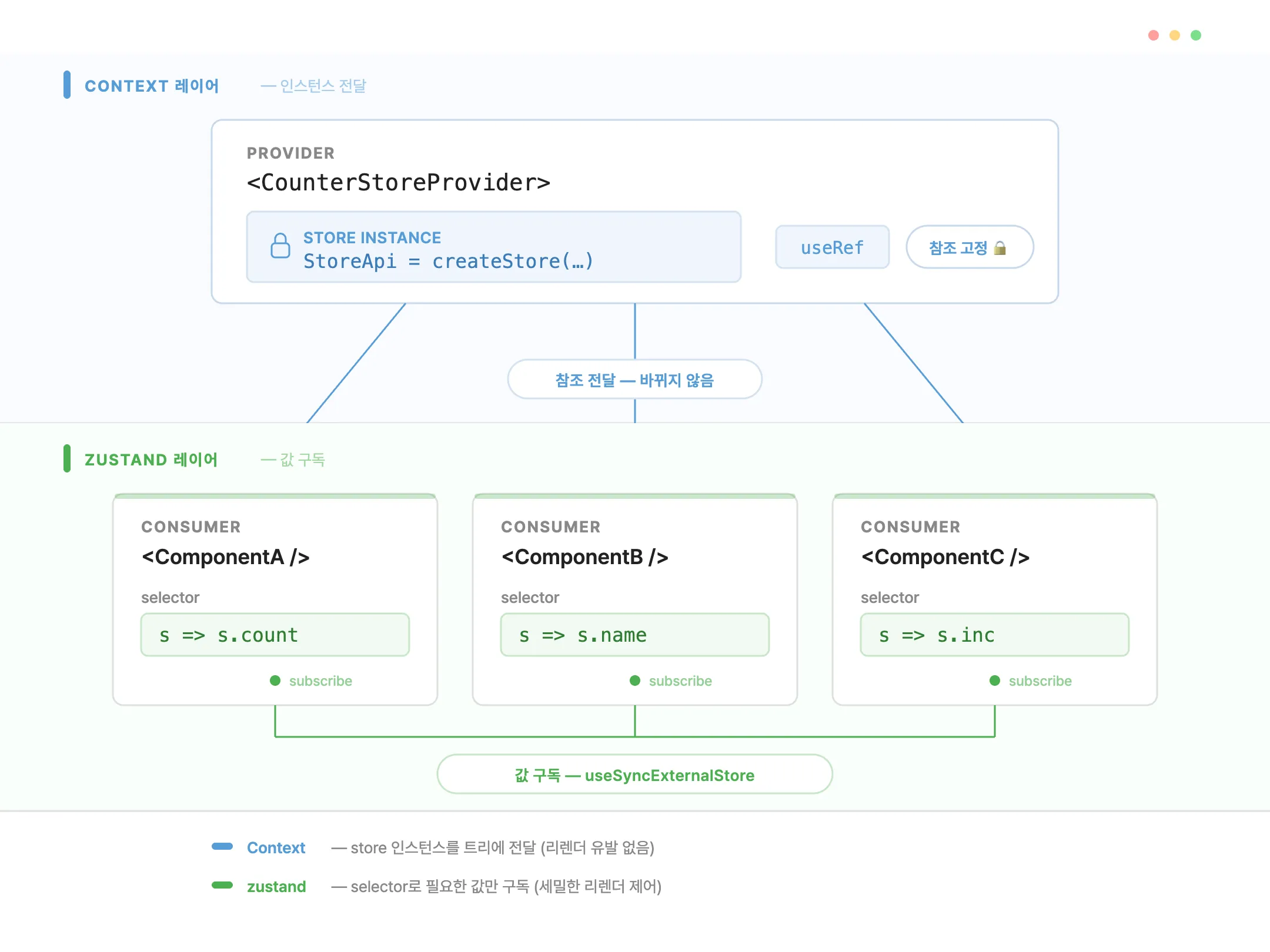
TkDodo의 글에서 이 구분을 잘 설명하고 있었습니다.
“The idea is to merely share the store instance via React Context - not the store values themselves.”
이게 왜 중요한지 조금 더 풀어 보면 이렇습니다.
React Context는 value가 바뀔 때 모든 Consumer를 리렌더합니다.
그래서 Context에 자주 바뀌는 값을 넣으면 성능 문제가 생기죠.
하지만 여기서 넣는 건 store 인스턴스, 즉 StoreApi 객체 자체입니다.
이 객체의 참조는 Provider가 마운트된 이후 절대 바뀌지 않습니다.
그렇다면 store 안의 값이 바뀔 때 컴포넌트 리렌더는 누가 일으킬까요?
zustand의 내부 subscription 시스템이 처리합니다.
zustand는 내부적으로 useSyncExternalStore를 사용하여 store 값 변경을 감지하고, selector를 통해 구독한 값이 바뀌었을 때만 해당 컴포넌트를 리렌더합니다.
Info
useSyncExternalStore는 React 18에서 추가된 hook으로, React 외부의 데이터
소스(external store)를 구독할 때 tearing 없이 안전하게 동기화해주는 역할을
합니다.
이 패턴은 사실 새로운 것이 아닙니다. React Query의 QueryClientProvider가 QueryClient 인스턴스를, Redux의 Provider가 store 인스턴스를 Context로 공유하는 것과 동일한 구조입니다.
정리하면 역할이 이렇게 나뉩니다.
- Context의 역할: “어떤 store 인스턴스를 사용할지” 컴포넌트 트리에 알려주는 것
- zustand의 역할: “store 값이 바뀌었을 때 어떤 컴포넌트를 리렌더할지” 결정하는 것
이 구분이 잡히고 나니, 구현 코드가 자연스럽게 읽히기 시작했습니다.
직접 만들어 보기
Step 1. createStore로 팩토리 함수 만들기
store를 생성하는 함수를 먼저 만들었습니다.
이 함수가 호출될 때마다 새로운 store 인스턴스가 만들어지는데, 이것이 글로벌 create()와의 핵심 차이입니다.
import { createStore } from 'zustand/vanilla';

type CounterState = {
  count: number;
  inc: () => void;
  dec: () => void;
};

const createCounterStore = (initialCount = 0) =>
  createStore<CounterState>(set => ({
    count: initialCount,
    inc: () => set(s => ({ count: s.count + 1 })),
    dec: () => set(s => ({ count: s.count - 1 })),
  }));
initialCount 파라미터를 받는 부분을 주목해 주세요.
1편에서 “부모에서 받은 props로 store를 초기화할 수 없다”는 한계를 다뤘는데, 팩토리 함수로 만들면 생성 시점에 원하는 값을 넘길 수 있습니다.
이 복선은 Step 2에서 회수됩니다.
Step 2. React Context와 Provider
다음으로 store 인스턴스를 컴포넌트 트리에 공유하기 위한 Context와 Provider를 만들었습니다.
import { createContext, useContext, useState, type ReactNode } from 'react';
import { useStore, type StoreApi } from 'zustand';

const CounterStoreContext = createContext<StoreApi<CounterState> | null>(null);

function CounterProvider({
  children,
  initialCount = 0,
}: {
  children: ReactNode;
  initialCount?: number;
}) {
  const [store] = useState(() => createCounterStore(initialCount));
  return (
    <CounterStoreContext.Provider value={store}>
      {children}
    </CounterStoreContext.Provider>
  );
}
Tip
여기서 useState의 lazy
initializer를
쓰고 있습니다. useState에 값 대신 함수를 넘기면, React는 첫 렌더에서만
이 함수를 호출하고 이후 리렌더에서는 무시합니다.
setter를 사용하지 않으므로 store 인스턴스는 Provider가 살아 있는 동안 절대 바뀌지 않습니다.
initialCount props를 받아서 createCounterStore에 넘기는 부분이 앞서 심어둔 복선의 회수입니다.
useEffect 없이, 첫 렌더부터 원하는 초기값으로 store가 동작합니다.
한 가지 궁금할 수 있는 점이 있습니다. useRef로 store를 초기화하는 코드를 본 적이 있으실 겁니다.
zustand/context가 제거된 뒤 커뮤니티에서 논의된 대안 구현에서 이 패턴을 사용합니다.
// 커뮤니티 구현의 useRef 패턴: 동작은 하지만 시맨틱 보장이 약함
const storeRef = useRef<StoreApi<CounterState>>();
if (!storeRef.current) {
  storeRef.current = createCounterStore(initialCount);
}
참고: Zustand GitHub Discussion #1276 - createContext deprecation
이 패턴도 동작합니다. 하지만 TkDodo가 지적했듯, React는 ref 값의 안정성을 시맨틱하게 보장하지 않습니다.
- Strict Mode에서 컴포넌트를 두 번 마운트할 수 있고
- 미래의 React(Activity, 구 Offscreen API)에서 ref가 초기화될 가능성도 있습니다
반면 useState의 lazy initializer는 React가 의미론적으로 1회 실행을 보장합니다.
zustand 공식 문서도 Initialize state with props 가이드에서 useState를 사용합니다.
이 차이는 3편에서 유틸리티를 설계할 때 다시 등장합니다.
Step 3. 커스텀 hook
Provider가 제공하는 store를 편하게 쓸 수 있도록 커스텀 hook을 만들었습니다.
function useCounterStore<T>(selector: (state: CounterState) => T): T {
  const store = useContext(CounterStoreContext);
  if (!store) {
    throw new Error('useCounterStore must be used within <CounterProvider>');
  }
  return useStore(store, selector);
}
세 줄짜리 hook인데, 각 줄이 하는 일을 보면 구조가 드러납니다.
useContext로 가장 가까운 Provider에서 store 인스턴스를 가져옵니다- Provider 없이 사용했을 때 명확한 에러 메시지를 던집니다
useStore가 store 인스턴스와 selector를 연결하여, selector가 반환하는 값이 바뀔 때만 리렌더를 일으킵니다
Step 4. 사용하기
완성된 패턴을 실제로 사용하면 이런 모습입니다.
function CounterDisplay() {
  const count = useCounterStore(s => s.count);
  const inc = useCounterStore(s => s.inc);
  return (
    <div>
      <span>{count}</span>
      <button onClick={inc}>+</button>
    </div>
  );
}

// App에서 Provider로 감싸면 끝
function App() {
  return (
    <CounterProvider initialCount={0}>
      <CounterDisplay />
    </CounterProvider>
  );
}
글로벌 create() 패턴과 비교하면, 컴포넌트 코드는 거의 동일합니다.
useCounterStore(selector) 호출 형태도 같고, selector로 필요한 값만 구독하는 것도 같습니다.
달라진 건 store가 Provider 단위로 격리된다는 점뿐입니다.
이 차이가 1편에서 다뤘던 세 가지 한계를 어떻게 해결하는지 확인해 봤습니다.
1편의 세 가지 한계, 해결 확인
다중 인스턴스, Provider를 여러 번 쓰면 된다
<div style={{ display: 'flex', gap: '2rem' }}>
  <CounterProvider>
    <CounterDisplay /> {/* 독립적인 count */}
  </CounterProvider>
  <CounterProvider>
    <CounterDisplay /> {/* 독립적인 count */}
  </CounterProvider>
  <CounterProvider>
    <CounterDisplay /> {/* 독립적인 count */}
  </CounterProvider>
</div>
Provider를 세 번 렌더링하면, useState가 세 번 호출되고, createCounterStore도 세 번 호출됩니다.
각 Provider 안의 CounterDisplay는 자기만의 store 인스턴스를 바라봅니다.
첫 번째 카운터를 올려도 나머지 둘에는 아무 영향이 없습니다.
1편에서 글로벌 create()로는 이것이 불가능했습니다. 모듈 스코프에 store가 단 하나만 존재했으니까요.
.webp)
Props 초기화, useEffect 없이 깜빡임 없이
function EditorPage({ initialContent }: { initialContent: string }) {
  return (
    <EditorProvider initialContent={initialContent}>
      <Editor />
    </EditorProvider>
  );
}
Provider의 useState lazy initializer가 initialContent를 캡처하여 store를 생성합니다.
컴포넌트가 마운트되는 순간부터 올바른 초기값으로 동작하기 때문에, useEffect 동기화에서 발생하던 첫 렌더 깜빡임이 사라집니다.
1편에서 이 문제를 “초기화와 동기화는 다르다”고 표현했는데, 이 패턴은 정확히 “초기화”만 수행합니다.
테스트 격리, 매 테스트마다 새 store
function renderWithStore(ui: ReactElement, initialCount = 0) {
  return render(
    <CounterProvider initialCount={initialCount}>{ui}</CounterProvider>
  );
}

it('increments', () => {
  renderWithStore(<Counter />, 0);
  fireEvent.click(screen.getByText('+'));
  expect(screen.getByText('1')).toBeInTheDocument();
});

it('starts from initial', () => {
  renderWithStore(<Counter />, 42);
  expect(screen.getByText('42')).toBeInTheDocument();
  // 이전 테스트의 상태와 완전히 격리됨
});
각 테스트가 renderWithStore를 호출할 때마다 새로운 CounterProvider가 마운트되고, 새로운 store 인스턴스가 생성됩니다.
beforeEach에서 수동으로 state를 초기화할 필요가 없습니다.
테스트가 끝나면 Provider가 언마운트되면서 store도 자연스럽게 사라집니다.
Tip
세 가지 한계가 모두 해결됐습니다. 패턴 자체는 동작합니다.
그런데, store를 하나 더 만들어야 한다면
그런데 문제가 하나 남아 있었습니다. Counter store를 만드는 데 필요했던 코드를 돌아보면 이렇습니다.
createCounterStore팩토리 함수CounterStoreContext:createContext호출CounterProvider: Context.Provider를 감싸는 컴포넌트useCounterStore:useContext+useStore를 조합하는 커스텀 hook
프로젝트에 scoped store가 Counter 하나뿐이라면 이 정도는 괜찮습니다.
반복되는 보일러플레이트
Context, Provider, hook 전부 동일한 구조type CounterState = {
count: number
inc: () => void
}
const Ctx = createContext(…)
const factory = () =>
createStore<Counter>(…)
export function Provider(
{ children }
) {
const ref = useRef()
if (!ref.current)
ref.current = factory()
return (
<Ctx.Provider
value={ref.current}>
{children}
</Ctx.Provider>
)
}
export function useCounter
Store(sel) {
return useStore(…, sel)
}type EditorState = {
content: string
setContent: (s) => void
}
const Ctx = createContext(…)
const factory = () =>
createStore<Editor>(…)
export function Provider(
{ children }
) {
const ref = useRef()
if (!ref.current)
ref.current = factory()
return (
<Ctx.Provider
value={ref.current}>
{children}
</Ctx.Provider>
)
}
export function useEditor
Store(sel) {
return useStore(…, sel)
}type FormState = {
fields: Record<…>
setField: (k, v) => void
}
const Ctx = createContext(…)
const factory = () =>
createStore<Form>(…)
export function Provider(
{ children }
) {
const ref = useRef()
if (!ref.current)
ref.current = factory()
return (
<Ctx.Provider
value={ref.current}>
{children}
</Ctx.Provider>
)
}
export function useForm
Store(sel) {
return useStore(…, sel)
}하지만 실제 프로젝트에서는 에디터 store, 폼 store, 대시보드 패널 store…
scoped store가 3개, 5개로 늘어나면 2~4번을 매번 복사해서 타입만 바꿔 붙여넣게 됩니다.
Context 생성, null 체크, 에러 메시지, Provider 컴포넌트. 이 보일러플레이트는 store마다 구조가 동일하고, 달라지는 건 State 타입과 팩토리 함수뿐입니다.
다음 글에서는 이 반복을 약 40줄짜리 유틸리티 하나로 제거한 과정을 다룹니다.
useState vs useRef 초기화 방식의 시맨틱 차이, selector 필수 여부, 에러 메시지 개선 같은 작지만 중요한 설계 결정들이 있었습니다.
레퍼런스
- Zustand 공식 문서 - createStore
- Zustand 공식 문서 - useStore
- Zustand 공식 문서 - Initialize state with props
- Zustand GitHub Discussion #1276 - createContext deprecation
- Zustand GitHub Discussion #1975 - create vs createStore for context
- TkDodo - Zustand and React Context
- TkDodo - useState for one-time initializations
- React 공식 문서 - Rules of Hooks
- React 공식 문서 - useSyncExternalStore
- React 공식 문서 - useState (lazy initializer)